If you've ever heard someone say "my Bitcoin is sitting in my wallet," you might picture something like a leather billfold holding digital coins. That mental picture is almost exactly backwards, and it's the reason so many new buyers get confused, or worse, get scammed, in their first few months of owning crypto.
A crypto wallet doesn't actually store your Bitcoin. Your coins live on the blockchain itself, a public ledger that isn't sitting on your phone or in your desk drawer. What your wallet stores is the cryptographic keys that prove you own a specific amount of Bitcoin on that ledger and let you move it. Understanding that distinction changes how you think about security, backups, and who you trust with your money.
This matters even more if you're planning to buy on any real scale. The wallet you choose, and how carefully you set it up, determines whether your Bitcoin is truly yours or whether you're one mistake, one phishing email, or one compromised app away from losing it permanently.
In this guide, we'll break down what a wallet actually does, the real differences between the types available to you, and the practical habits that keep serious holders safe.
Quick quiz
What does a crypto wallet actually store?
The wallet and the blockchain
A wallet manages access while the blockchain maintains the record.
A crypto wallet is software or hardware that manages cryptographic keys. Those keys allow a person or service to authorize actions on a blockchain. The wallet also reads blockchain data and presents balances, transaction history and application activity through an interface.
Coins and tokens never sit inside the wallet app, phone or hardware device. A blockchain records which addresses control it. The wallet proves authority over an address by creating a valid digital signature with the correct private key.
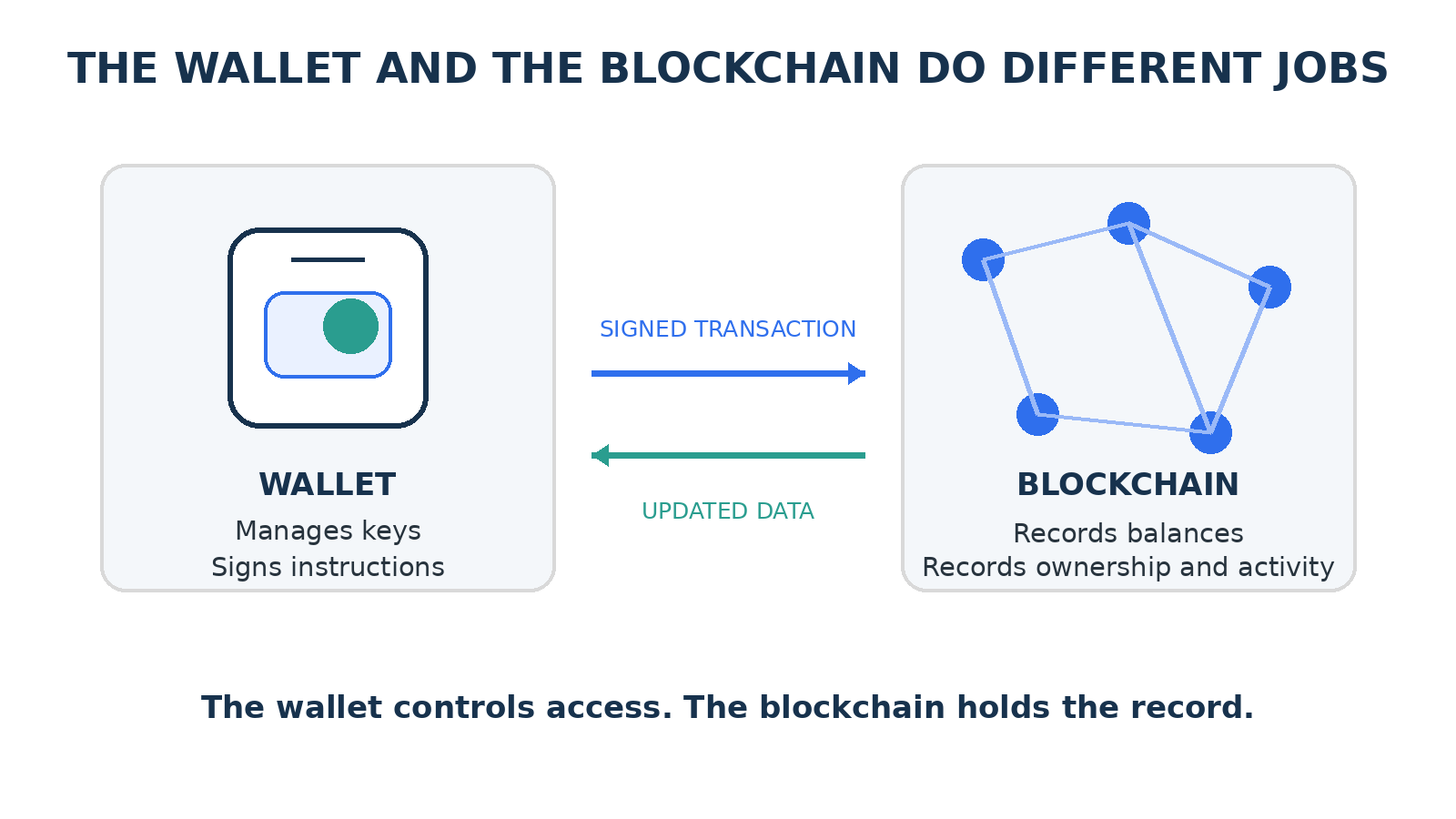
The wallet signs instructions and reads the blockchain's updated state.
A deleted wallet app does not delete the assets. Restoring the same keys in a compatible wallet recreates access to the same blockchain accounts. Losing the keys without a recovery method can make the assets permanently inaccessible.
A wallet performs four main jobs:
- It generates or imports keys
- Derives addresses
- Signs instructions
- Displays blockchain data.
Keys, addresses, and recovery
Each term describes a different part of wallet control.
A wallet normally begins with secret cryptographic material. It uses that secret to produce private keys and public addresses. The exact process depends on the wallet design and blockchain.
Term | Function | Exposure |
|---|---|---|
Private key | Creates signatures that authorize actions from one blockchain account. | Must remain secret. |
Public address | Identifies an account that can receive assets and appear in public records. | Can be shared. |
Recovery phrase | Recreates a group of private keys in many self-custody wallets. | Must remain secret and offline. |
Password or PIN | Locks the wallet interface on a device. | Protects local access but does not replace the recovery secret. |
Signature | Proves that the correct private key approved specific data. | Can be verified publicly without revealing the key. |
One wallet can manage many accounts and addresses. A recovery phrase can derive several private keys, and each key can control a different address. Wallet apps can also support several networks at the same time.
A password usually protects the app on one device. It does not restore the wallet after the device is lost. The recovery phrase or another recovery method restores control. Some newer wallets use passkeys, multiple authorized devices, guardians or smart-contract recovery instead of a traditional phrase.
Anyone who obtains the private key or recovery phrase can act as the owner. The blockchain cannot distinguish theft from legitimate use when the signature is valid.
How a wallet sends a transaction
The wallet signs an instruction before the network changes its records.
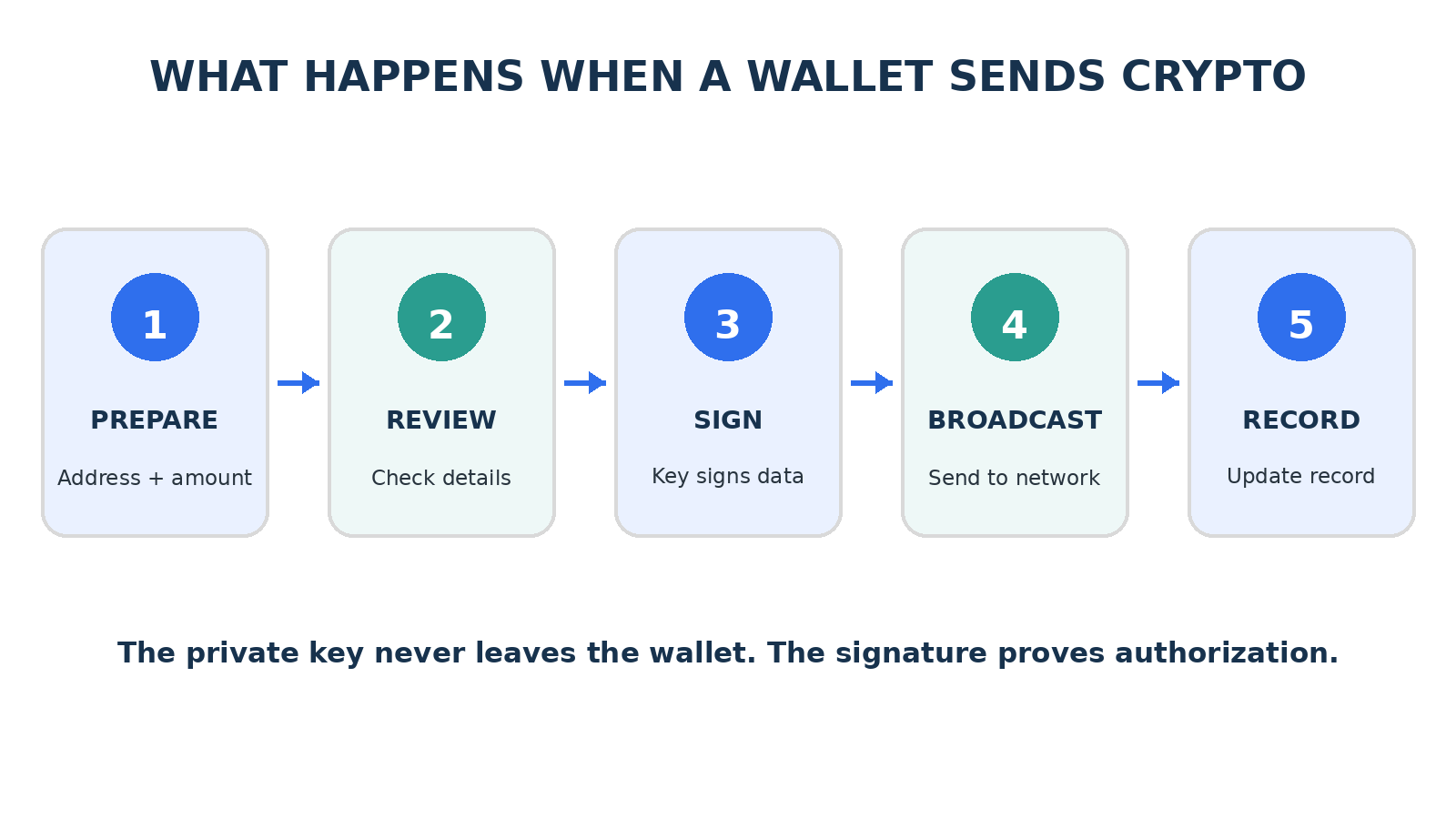
A transaction moves from preparation to signature, broadcast, verification and recording.
- The app first prepares transaction data: That data includes the destination address, asset amount, network fee and any smart-contract instruction. The wallet displays the details and requests approval.
- After approval, the wallet uses the private key to create a digital signature: The key stays inside the wallet or hardware device. The wallet then broadcasts the signed transaction to the network. Nodes verify the signature and apply the network rules before validators or miners include the transaction in a block.
- A wallet can display a pending transaction before the network confirms it: Congestion, an insufficient fee, a conflicting transaction or a failed smart-contract condition can delay or reject the action. The wallet reports the result, but the network determines the final state.
The signature authorizes exact data: Changing the recipient, amount or instruction after signing invalidates the signature.
Quick quiz
Where does Bitcoin actually "live" if not in your wallet?
Custody and wallet types
Custody identifies who controls the keys and the recovery process.
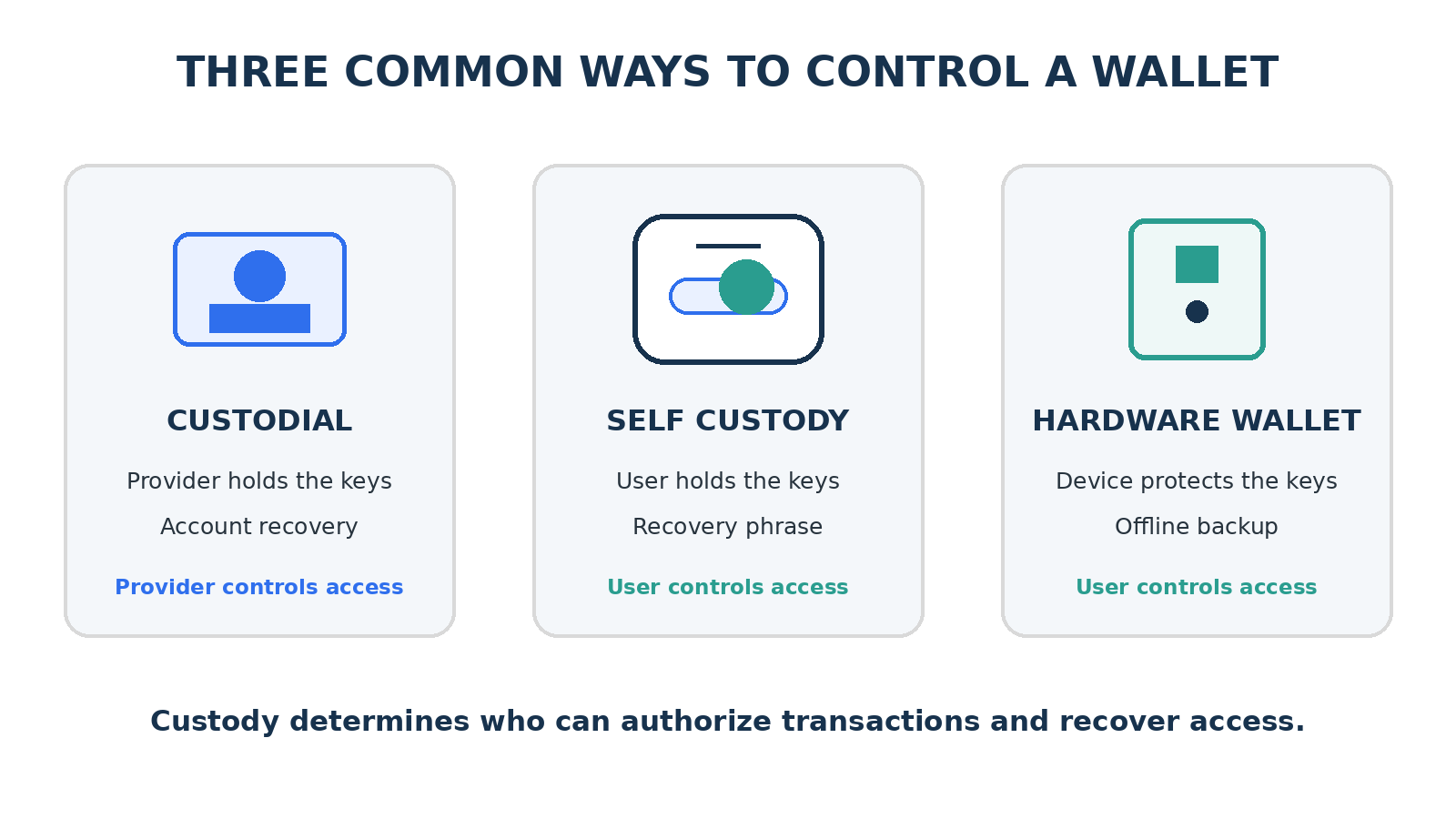
Different wallet designs place control and recovery in different hands.
A custodial wallet keeps the keys under a provider's control. The user signs in with an account and asks the provider to process withdrawals or transfers. Password resets and customer support can restore access, but the provider can restrict activity, delay withdrawals or lose funds through failure or attack.
A self-custody software wallet keeps the keys under the user's control, usually on a phone or computer. It offers direct access to blockchain applications, but malware, phishing, device compromise and poor backups create serious risks.
A hardware wallet stores private keys in a dedicated device and signs transactions inside that device. It reduces exposure to an internet-connected computer, but it cannot make a harmful transaction safe. The user must still verify the destination, amount, network and contract instruction.
A smart-account wallet uses a smart contract as the account. It can support recovery guardians, spending limits, multiple approvals, transaction batching or sponsored fees. Its security also depends on the contract code, upgrade controls and recovery design.
Get new Decode Web3 posts in your inbox.
Add any other topics you want to receive.
Custody changes responsibility: Provider custody adds recovery and counterparty risk. Self-custody removes the provider from key control and makes backup discipline essential.
Wallet accounts and networks
The app, account, address and network are related but separate.
The wallet app provides the interface. The wallet account represents a set of authorization rules. The address identifies that account on a blockchain. The network holds the transaction record.
A single wallet app can manage multiple addresses. It can also connect to several networks. Some compatible networks use an address with the same visible characters, but each network maintains a separate record. An asset on one network does not automatically exist on another network.
Item | What it means | Common mistake |
|---|---|---|
Wallet app | Software used to manage keys and interact with networks. | Treating the app as the location of the assets. |
Account | The authority and rules attached to blockchain activity. | Assuming every account uses one private key. |
Address | A public identifier for receiving assets or calling contracts. | Sending to the wrong address or an unsupported destination. |
Network | The blockchain that records the transaction and asset. | Selecting the wrong network because the address looks familiar. |
Token contract | The code that defines a token on a specific network. | Trusting a token name without checking its contract address. |
Wallets often show token balances by reading known token contracts. A fake token can copy the name and symbol of a real asset. The contract address and network identify the asset more reliably than its displayed name.
Network accuracy matters: A correct address on the wrong network can produce an asset that the receiving service cannot access or credit.
Transactions, messages, and approvals
A wallet can authorize more than a direct transfer.
A transaction changes blockchain state. It can transfer an asset, exchange tokens, deposit collateral, mint an item or call a smart contract. It normally requires a network fee even when the action fails after execution begins.
A message signature proves control of an address without directly changing the blockchain state. Applications use it for sign-in, ownership verification and off-chain instructions. A signed message can still carry risk when it authorizes an order, permit or other action that another party can submit later.
A token approval gives a smart contract permission to move a specified token from an address. Some approvals set a fixed amount, while others allow a very large amount. The permission can remain active after the user leaves the website.
Wallet prompt | Effect | Safe review |
|---|---|---|
Send | Moves an asset to another address. | Confirm recipient, amount, asset and network. |
Contract interaction | Runs code that can move assets or change permissions. | Confirm the application, function, limits and fee. |
Token approval | Allows a contract to spend a token. | Limit the amount and remove unused approvals. |
Message signature | Proves control or authorizes off-chain data. | Read the domain, purpose and readable message. |
Network switch | Changes the network shown by the wallet. | Confirm that the intended asset and application use that network. |
Wallet security
Valid signatures make prevention more reliable than reversal.
Blockchain transactions often settle without a central chargeback system. Strong wallet security combines secret protection, transaction review, device security and limited exposure.
Protect the recovery secret
Store recovery phrases and private keys offline. Keep more than one durable backup in separate secure locations. Never place the phrase in a screenshot, cloud note, email, direct message or support form. No legitimate wallet support agent needs it.
Review every authorization
Confirm the domain, network, recipient, asset, amount, contract and fee. Read wallet warnings. Use a small test transaction when a new address, bridge or unfamiliar network creates uncertainty.
Separate risk
Keep long-term holdings away from everyday application activity. Use a separate wallet for experiments, mints and unfamiliar sites. Limit the assets held in the active wallet and remove approvals that no longer serve a purpose.
Secure the device and the recovery process
Use device encryption, current software, strong access controls and trusted wallet sources. Test the recovery procedure before relying on a new wallet. Record the correct wallet type, network and derivation details needed for restoration.
Threat | What it targets | Primary protection |
|---|---|---|
Phishing | Recovery secrets or harmful signatures | Verify domains and reject unsolicited links. |
Malware | Clipboard data, screens or wallet files | Secure devices and verify addresses on a trusted display. |
Physical loss | Phone, computer or hardware device | Maintain tested offline recovery backups. |
Malicious contract | Approvals and signed transactions | Limit permissions and isolate risky activity. |
Quick quiz
Why does understanding how wallets work matter for security?
Choosing and using a wallet
The best design matches the assets, activity and recovery needs.
A wallet should support the required network, asset and application. Its custody model must also match the user's ability to protect keys and recover access.
Need | Suitable starting point | Main tradeoff |
|---|---|---|
Small everyday activity | A reputable software wallet with limited funds | Convenience increases online exposure. |
Long-term or higher-value storage | Hardware wallet with tested offline backup | Extra steps and device management. |
Frequent application use | Separate self-custody wallet for active transactions | More accounts and approvals to manage. |
Easy recovery and support | Reputable custodial service where appropriate | The provider controls the keys and access. |
Teams or shared funds | Multisignature or smart account with clear signer rules | More setup, coordination and contract risk. |
A careful setup.
Download the wallet from its verified source and confirm the supported networks.
Create the wallet in a private environment and record the recovery method offline.
Verify the first receiving address on the wallet or hardware display.
Fund the wallet with a small amount and complete a test transaction.
Review connected applications and token approvals regularly.
A wallet interface can make blockchain activity feel familiar, but it does not remove the underlying rules. The network, keys, signatures and contracts still determine what happens.
Final takeaway
A crypto wallet is a control system for blockchain accounts. It manages keys, signs instructions and displays network data. Security depends on who controls the keys and what each signature authorizes.
Join the conversation
What stayed with you? Leave a thought or a question. Comments appear after approval.
Loading comments…